Microsoft Store
Single user
€89.99 one-time
incl. VAT · 30-day free trial
- For one person, all features
- Buy once, no subscription
- Purchase, trial and updates through Microsoft Store
Click through your program once. stepdok turns it into a finished step-by-step guide with images, cleanly redacted and in your organisation’s layout.
30 days free trial, full features. Then you decide.
Records Windows programs: line-of-business software, practice and clinic systems, Windows dialogs – including everything a browser extension cannot see.
No account, no cloud, no telemetry. Recording, detection, redaction and export run on the PC – even in an isolated network.
Word export with your house template and classification, policies via Group Policy or Intune, team folders on a network drive.
01How it works
Your first guide in five minutes, without a manual.
Pick a program, the whole screen or a region and work as usual. Every click becomes a step with image and text – stepdok writes “Click “Save”.” by itself.

In the editor you reorder steps, add tips and warnings and mark with a number, frame or arrow. Personal data is already redacted – the privacy check shows every spot.

As Word with your template, as PDF, as a single HTML file or as Markdown. The file is created on this PC. Nothing is uploaded.

02Privacy
stepdok detects personal data in the image – from the texts of the program’s interface and with text recognition – and redacts it automatically. Every redaction can be traced, nothing is decided silently: uncertain spots ask you.
Each category can be switched off or enforced by policy. Detection uses check digits, field labels such as “Surname” and a list of first names – no AI model, no download.
Every finding with preview, location and decision: Redacted or Keep visible. The same spot in several images is one decision. If IT wants it, a passed check is required before export.
On export the pixels are replaced, not covered. Images without metadata, no template path in the Word document. Nothing can be recovered, not even from Word.
The unredacted images stay in the guide, encrypted with Windows DPAPI, so “Keep visible” remains possible. Only your Windows account can read them – everyone else sees redacted images.
Password fields appear in no image. Typed values are not put into step texts by default, keystrokes never into the log. “Never record” excludes password managers, sign-in dialogs and programs of your choice.
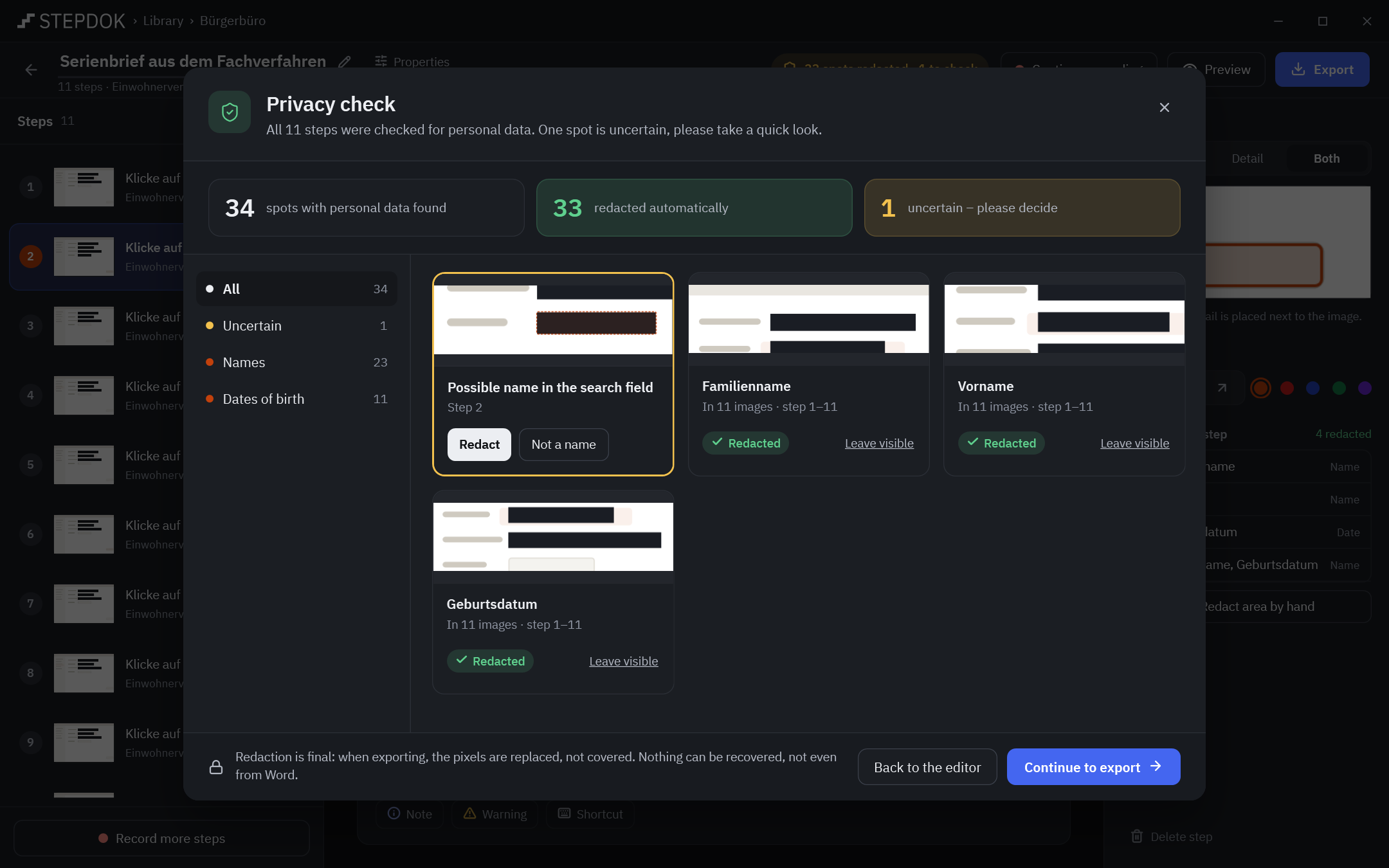
To be honest: automatic detection does not find everything – for example surnames without context, handwriting or text that is hard to read. That is why the privacy check shows every spot for review.
03Features

Number, frame, arrow, text, highlight, blur, redact, crop. Zoom detail next to the image, unlimited undo.
German step texts in informal, formal or neutral form; English in the imperative. The guide’s language is independent of the interface.
Your own Word template (.dotx), logo, document colour, header and footer, classification – as a template package for the whole organisation.
Network drive, UNC path or synced SharePoint/Teams folder. Whoever edits holds the lock; everyone else reads or makes a copy.
Across titles, step texts, programs and folders of all libraries, jumping straight to the step. Commands such as “New recording” in the same search.
Interface and generated step texts equally good in both languages; switch without restarting.
Light, dark or follow the system. Choose an accent colour and a text size from 90 to 130 %.
Fully usable with the keyboard, meaningful names for screen readers, Windows contrast themes. Every shortcut can be changed.
Every step is saved the moment it is recorded; after a crash stepdok offers to restore the recording. Trash with 30 days.
04Export
One guide, one layout model – Word, PDF, HTML and Markdown look like the preview. Spots you have not decided on are exported redacted.
With your .dotx: styles, margins, header and footer, logo. stepdok formats only through named styles – you control the look in Word.
Fonts embedded, a bookmark per step, tagged for accessibility. Metadata only title and program name.
A single file with embedded images, print-friendly, loads nothing from the network when opened.
Text with an image folder – for wikis, repositories and documentation systems.

05For organisations and IT
Built for public administration, law and tax firms, hospitals and practices, banks and insurers, IT service providers and industry – and for the IT team that runs it.
ADMX template with ADML in German and English. Enforce redaction and lock categories, central patterns, “Never record”, allowed export formats, classification, salutation, storage locations, updates and online activation. Locked settings show a padlock: “Set by your IT department”.
MSIX package for Intune and software distribution; single users through Microsoft Store. Runs without administrator rights, without services, without drivers. Windows 10 (22H2) and Windows 11.
Set team folders and the library by policy, load the template package from a network path – the whole organisation gets the same look.
Activation with a request and response file, organisation licence from a file on a share. With updates and online activation switched off, stepdok opens no network connection at all.
--export for scripts with exit codes, --policy-report shows the effective policies, --selftest checks recording, redaction and every export.
A .stepdok file is a ZIP with JSON and PNG, openly documented. No lock-in – an argument in public procurement, too.

06Pricing
30 days free trial – full features, no watermark, no account.
Microsoft Store
€89.99 one-time
incl. VAT · 30-day free trial
from 5 seats
on request
volume pricing
one-off
on request
plus optional maintenance
Store price incl. VAT; in Microsoft Store the price shown there applies. Quotes for team, public sector and perpetual licences plus VAT. After the trial everything you have stays usable: view guides, finish the privacy check, export to every format. New recordings, editing and changing templates need a licence.
07FAQ
Yes. Recording, detection, redaction and export run on the PC. There is no account, no cloud and no telemetry. Network connections exist only for licence activation, updates and purchase links you click yourself – content is never transferred.
Windows programs – a single program (stepdok follows its window, including menus and dialogs), the whole screen for workflows across several programs, or a fixed region. Where no control is recognised (for example in Citrix or Java without Access Bridge), the step gets a marked click position and the text “Click the marked spot.” Programs running with administrator rights can only be recorded when stepdok is started as administrator, too.
Names, e-mail addresses, phone numbers, IBAN and account numbers, dates of birth, places and addresses, tax ID, social security and AHV number, licence plates (off by default) and your own patterns such as file numbers. Detection uses check digits, field labels and a list of first names. Uncertain findings ask you. It does not find everything – that is why the privacy check shows every spot.
No. On export the pixels under a redaction are replaced, not covered, and the images carry no metadata. The exported document contains no original content.
No. stepdok only recognises that something was typed into a field or that a shortcut was pressed (“Enter … in “Surname”.”, “Press Ctrl+S.”). It takes over the typed value only when you explicitly switch that on, the field is not a password field and no personal data is detected. Nothing is stored from password fields, and keystrokes never go into the log.
Yes. stepdok takes styles, margins, header and footer with logo and page numbers from your .dotx. Content controls such as Stepdok.Organisation or Stepdok.Kennzeichnung are filled in. With a template package the whole organisation gets the same look.
Yes, through team folders on a network drive, UNC path or synced SharePoint/Teams folder. Whoever edits a guide locks it; everyone else sees “being edited” and can read it or make a copy. Saving is atomic – never a half-written file on the network drive.
The trial lasts 30 days with all features. Afterwards everything you have stays usable: the library, viewing guides, finishing the privacy check and exporting to every format. New recordings, editing and templates need a licence.
Windows 10 (22H2) and Windows 11, 64-bit. stepdok runs without administrator rights, also per user on terminal servers, and supports several monitors with different scaling.
Not for working. Licences can be activated offline with a request and response file, organisation licences loaded from a file via policy. The Store version gets its licence and updates through Microsoft Store.
30 days free trial. No account, no cloud.